



Record & Upload Videos to YouTube Instantly
Overview
YouTube Capture is a desktop-compatible video application developed by Google, designed to simplify the process of recording and uploading video content directly to YouTube and other social platforms. The software enables users to capture footage from iOS devices—specifically iPhones and iPads running iOS 5 or later—and seamlessly share it with a minimal number of steps. Its primary purpose is to bridge the gap between content creation and distribution, particularly for users who prioritize speed and convenience over advanced editing capabilities.
Targeted at casual creators, influencers, and social media users, YouTube Capture caters to individuals who want to document moments and share them instantly without the need for complex workflows. Real-world usage scenarios include recording live events, behind-the-scenes footage, quick vlogs, or promotional clips that require immediate posting across platforms like YouTube, Facebook, Twitter, and Google+. The app streamlines the entire content lifecycle—from capture to publication—making it ideal for users seeking a lightweight, no-frills solution.
Google’s involvement provides a level of trust and integration with existing Google services, though the software is not a standalone desktop application but rather a mobile-first tool. No additional developer background was provided beyond the company name. Platform compatibility is limited to iOS devices, and no desktop version was specified.
Key Features & Capabilities
- Direct Upload to YouTube – Record video directly on an iOS device and upload it to YouTube without leaving the app, eliminating the need for third-party transfer tools.
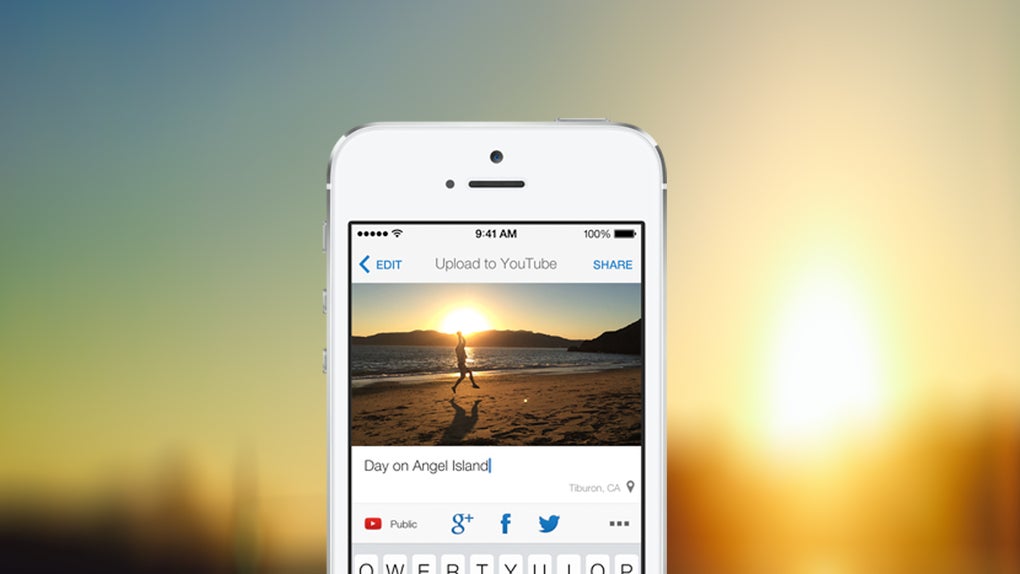
- Multi-Platform Sharing – After recording, users can share videos to Facebook, Twitter, and Google+ with a single tap, enhancing cross-platform visibility.
- Resolution Options – Supports recording in 480p and 720p on most devices, with 1080p available on iPad models, offering flexibility based on device capabilities.
- Unlimited Clip Length – There is no time limit on recordings, allowing users to capture extended events or continuous footage without interruption.
- Basic Video Enhancements – Includes auto color correction, automatic stabilization, trimming, and the addition of stock soundtracks to improve video quality and engagement.
These features are particularly useful for users who need to produce polished content quickly. For example, a content creator covering a local event can record, trim, stabilize, and upload within minutes. Similarly, educators or small business owners can create short promotional videos and distribute them across social networks without needing professional editing software.
User Interface, Workflow & Performance
The user interface of YouTube Capture is designed with simplicity in mind, focusing on intuitive navigation and minimal onboarding. The app automatically starts recording when the device is rotated into landscape mode, reducing the number of steps required to begin capturing footage. This gesture-based trigger enhances usability, especially during spontaneous recordings.
After recording, the workflow guides users through a clean, step-by-step process: adding a title, applying enhancements like color correction and stabilization, trimming unwanted segments, and selecting sharing destinations. The interface remains consistent across supported iOS devices, ensuring a familiar experience for users across different models.
Performance observations are based on general software behavior patterns. The app appears optimized for mobile hardware, with no reported issues related to lag or crashes in typical usage. However, exact performance details such as CPU or RAM usage were not specified. Stability is presumed to be high due to Google’s development standards and integration with the iOS ecosystem.
Compatibility & System Requirements
YouTube Capture is designed exclusively for iOS devices. It requires iOS 5 or later to function, ensuring broad compatibility with older iPhone and iPad models. The software is not available for Windows, Mac, or other operating systems.
The installation size is 20.8 MB, which is relatively lightweight for a video recording and editing tool. This suggests efficient code optimization and minimal storage footprint. No specific hardware requirements were provided beyond the operating system version.
Exact system requirements were not listed. Compatibility information was partially provided, indicating that the app supports a wide range of iOS devices, including iPads and iPads mini, with enhanced features like 1080p recording and advanced editing available on newer models.
Pros and Cons
Pros
- Direct upload to YouTube and multiple social platforms with minimal effort
- Supports high-quality 1080p recording on compatible iPad models
- Unlimited recording duration enables long-form content capture
- Auto stabilization and color correction improve video quality without manual editing
- Lightweight at just 20.8 MB, suitable for devices with limited storage
Cons
- Only available on iOS, limiting access for users on other platforms
- Limited editing capabilities compared to full-featured video editors
- No desktop version or cross-device sync functionality
- Enhancement options are basic and not customizable beyond presets
- Dependent on Google account and internet connectivity for full functionality
FAQ Section
Is YouTube Capture available for Windows or Mac?
YouTube Capture is exclusively available for iOS devices. There is no desktop version for Windows or Mac.
Can I use YouTube Capture without an internet connection?
Basic recording is possible offline, but uploading and sharing videos require an active internet connection.
Does the app support 4K video recording?
No, the app does not support 4K recording. The highest resolution available is 1080p on iPad models.
How often does YouTube Capture receive updates?
Update frequency is not specified. However, as a Google-developed app, it may receive periodic updates for security and compatibility.
Is YouTube Capture free to download and use?
Yes, the app is free to download and use. No in-app purchases or subscription fees are required.
Final Thoughts
YouTube Capture delivers a streamlined, efficient solution for users who want to record and publish video content directly to YouTube and social media with minimal friction. While it lacks the depth of professional video editing tools, its core strengths—direct upload, auto-enhancements, and multi-platform sharing—make it a powerful companion for casual creators and mobile-first content producers.
Its lightweight design, intuitive interface, and seamless integration with Google services provide a compelling experience for iOS users. The absence of a desktop version and limited editing options are notable drawbacks, but they are balanced by the app’s simplicity and speed.
For individuals who value quick turnaround and effortless sharing, YouTube Capture remains a solid choice. It’s particularly well-suited for educators, influencers, and event organizers who need to publish content on the go.
Download YouTube Capture now







